

Epson Printer Error Code 00041 is one of the technical issues that can suddenly appear on Epson printers, even when they were functioning normally before.
This error often appears suddenly and renders the printer unusable, even tho it was functioning normally before.
To avoid mistakes and prevent serious damage, users should understand this error, its causes, and safe ways to fix it.
What Is Epson Printer Error Code 00041?
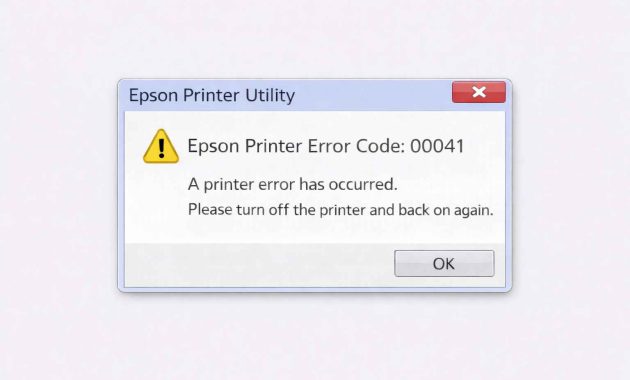

Epson printer error code 00041 usually relates to internal system issues. It can also affect the printer’s startup process.
When this error occurs, the printer detects a problem in its internal system.As a precaution, it stops all activity.
Unlike ink or paper errors, error code 00041 relates more to system and internal communication issues. This is why the printer often appears physically normal but cannot execute print commands.
Why Can Epson Printer Error Code 00041 Occur?
There are several factors that can trigger the appearance of error 00041. Generally, the causes are interconnected and not standalone. Here is the complete explanation:
1. Internal System Malfunction Internal System Disruption
The printer control system operates automatically and sensitively. When there is an internal data reading error, the printer will display an error code as a form of protection.
2. Firmware Issues
Outdated, damaged, or failed firmware updates can cause system conflicts that trigger errors.
3. Incompatible Printer Driver
A driver that does not match the operating system version or is not installed properly can disrupt communication between the computer and the printer.
4. Unstable Data Connection
A faulty USB cable or loose port can cause print commands to be poorly received.
5. Unstable Electrical Voltage
Power surges or sudden outages can potentially affect the printer’s control module.
In many cases, the Epson printer error code 00041 appears due to a combination of software interference and unstable electrical conditions.
How to Fix Epson Printer Error Code 00041?
Before taking the printer to a technician, users can try the following safe steps:
1.Turn Off the Printer and Disconnect All Cables

Completely turn off the printer, unplug the power and data cables, and let it sit for 10–15 minutes to allow the internal system to perform a natural reset.
2. Check the Condition of the Cables and Ports
Ensure the USB cable is not damaged and the computer port is functioning normally. If possible, use another cable to ensure there is no connection interference.
3. Turn on the Printer Without Connecting to the Computer
Turn on the printer in standalone mode. If the error does not appear, the problem is likely coming from the driver or the computer system.
4. Reinstall the Printer Driver

Completely remove the old driver, then reinstall the driver that matches the printer model and operating system.
5. Update the Printer Firmware
If available, update the firmware according to the official guidelines to restore printer system stability.
6. Use a Stable Power Source
Connect the printer directly to the wall outlet without using stacked electrical terminals to avoid power disruptions.
If the error still appears after all these steps, there is a possibility of an internal module malfunction that requires professional handling.
When Does Error Code 00041 Usually Appear?
This error can occur under the following conditions:
1. When the printer is first turned on
2. When the printer receives a print command
3. After the printer is connected or disconnected from the computer
4. After a driver or operating system update
5. When the printer is used for an extended period without a break
If the error persists even after the printer has been turned off and on again, it is likely that the problem is not temporary.
Where Is the Source of Error 00041 Located?
The source of the 00041 error is generally within the printer’s internal system, including:
1. Printer firmware
2. Main control module
3. Data communication system
4. Internal sensors
Due to its systemic nature, this error often cannot be resolved simply by cleaning the printer or replacing basic physical components.
Who Should Handle This Error?
Home users can try basic steps such as resetting and reinstalling the driver. However, if the Epson printer error code 00041 appears repeatedly or the printer cannot start normally, it is advisable to take the printer to an official Epson service center or an experienced technician.
Disassembling a printer without technical expertise can cause permanent damage to the electronic components.
How to Prevent Error 00041 from Recurring?
Prevention is the best step to keep the printer durable and stable. Some tips that can be applied include:
1. Use a power source with stable voltage
2. Avoid turning off the printer forcefully
3. Update drivers and firmware regularly
4. Use high-quality data cables
5. Take breaks when using the printer for extended periods
With regular maintenance, the risk of system errors can be significantly minimized.
Impact If Error 00041 Is Ignored
Ignoring this error can lead to several subsequent impacts, such as:
1. The printer cannot be used in the long term
2. Damage to the internal control module
3. Higher service costs
4. Decreased work productivity
Early handling is highly recommended to prevent the printer from experiencing more serious damage.
FAQ – Epson Printer Error Code 00041
1. What is the main cause of Epson printer error code 00041?
The cause is usually related to internal system disruptions, problematic firmware, or incompatible drivers.
2. Can error 00041 be fixed at home?
Yes, if the cause is minor like a cable or driver issue. However, not all cases can be handled independently.
3. Does resetting the printer always resolve this error?
Not always. A reset is only effective for temporary system disruptions.
4. Is error 00041 dangerous for the printer?
If left unchecked, this error can cause more serious system disruptions.
5. Is it safe to update the firmware by yourself?
Safe, as long as you use official firmware and follow the procedure correctly.
6. When should the printer be taken to a technician?
If the error keeps appearing after all basic steps have been taken or the printer cannot start normally.
Read More: Canon Printer Error Code 5200 Fix – Quick Solution for You!